The password everyone has
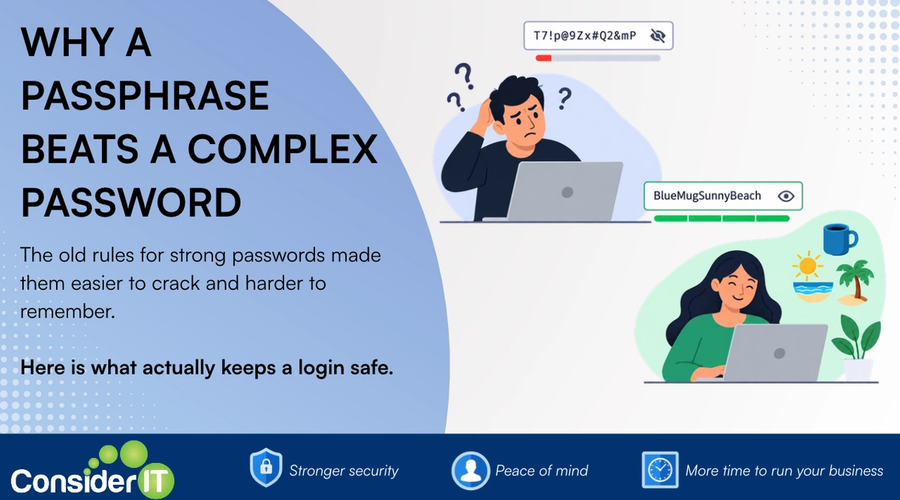
Somewhere in your business right now, someone is signed in with a password that looks like Summer2024! Maybe it is Perth2025$ or the company name with a number on the end. It has a capital letter, a number and a symbol, so every system accepts it as strong.
It is not strong. It is one of the first passwords an attacker will try, and that is not the fault of the person who chose it. For twenty years we told people that a strong password needed those three ingredients, and people did exactly what they were told.
This post explains why that advice went wrong, what the people who write the standards say now, and why Consider IT asks everyone we look after to use a passphrase of at least 16 characters. If you want to skip the why and go straight to the how, the guide is here: How to create a passphrase that beats a complex password.
How passwords actually get cracked
Most people picture an attacker sitting at a login screen typing guesses. That almost never happens, because login screens lock you out after a handful of attempts.
What actually happens is this. A website or service you use gets breached, and its list of usernames and scrambled passwords is copied out. The attacker then runs guessing software against that list on their own computers, where there is no lockout and no limit. Modern graphics cards try billions of guesses a second, and they run all night.
The software does not guess at random. It starts with lists of passwords that have leaked in earlier breaches, then applies the habits people have: capitalise the first letter, put the number on the end, swap an a for an @, add an exclamation mark. Every rule we were taught became a rule the cracking software applies automatically.
Summer2024! falls to that process in seconds. So does P@ssw0rd, and so does your company name with the year on the end.
This is not a theoretical risk. Verizon’s 2025 Data BreachWhen private information is accessed, stolen or leaked without permission. Investigations Report (DBIR), which analysed more than 12,000 confirmed breaches, found that stolen credentials were the single most common way attackers got in, ahead of software vulnerabilities and phishingFake emails or messages that trick you into giving up passwords or clicking dangerous links by pretending to be someone you trust.. Verizon’s own follow-up research on credential stuffingWhen attackers use stolen username and password pairs from one breach to try logging into your other accounts. puts the figure at 22 per cent of breaches [4]. The password is still the front door.
Why the complexity rules backfired
The capital, number and symbol rule came from a well-meaning idea: more types of character means more possible combinations. On paper that is true. In practice people do not pick characters at random, they pick the smallest change that makes the red error go away.
The result was passwords that look complicated to a human and are completely predictable to software. They were also hard to remember, which pushed people to write them down, reuse them, or change one digit every time they were forced to reset.
The organisations that write the rules have changed their position, and they have done it in two steps. In 2017 the US National Institute of Standards and Technology (NIST) stopped recommending complexity rules and forced resets. In August 2025 it went further. Revision 4 of NIST Special Publication 800-63B now says that systems shall not impose composition rules and shall not require periodic password changes. It also raised the recommended minimum length for a password used on its own to 15 characters [2].
Australia got there first. The Australian Signals Directorate’s Australian Cyber Security CentreThe Australian government body that issues cyber security advice, alerts and guidance for businesses. (ACSC) has recommended passphrases built from random words for years, and its Information Security Manual sets the floor at four words and 14 characters [1, 3]. The advice shifted because the evidence did.
Why length wins
Every extra character in a password multiplies the number of guesses needed to find it. Not adds, multiplies. The arithmetic is worth seeing once.
Take a password made only of lowercase letters. At 8 characters there are about 200 billion possible combinations. That sounds like a lot until you remember the cracking software tries billions a second, so it is gone in minutes. At 16 characters the number of combinations is about 40 billion billion billion. The same software, running flat out, does not finish in a human lifetime.
A passphrase gets you that length without asking you to remember anything strange. Four random words, like lantern biscuit orbit cactus, is 28 characters and takes a few goes to learn. A random 12-character string of symbols is shorter, weaker, and impossible to hold in your head.
What random actually means
The word random is doing a lot of work here, and it is where most passphrases go wrong.
A song lyric, a famous quote, or a sentence about your dog is long, but it is also on a list. Cracking software carries dictionaries of lyrics, quotes and common phrases, and it tries those before it tries anything else. A passphrase made of words that belong together is a sentence, and sentences are predictable.
Four words that have nothing to do with each other are not on any list. Open a book to four pages and take one word from each. Look around the room and name four objects. The ACSC guidance is specific on this point: the words should be unpredictable and should not form a sentence [1].
You do not have to think up the words yourself, and for most logins you should not. Our order of preference is this.
- Let your password managerA secure app that creates and remembers strong, unique passwords for you so you do not have to. generate it and store it. This is the right answer for every login except one. The manager makes a different random passphrase for every site, saves it, and fills it in when you sign in. You never see most of them and you never have to remember any of them, which is exactly what makes having a unique passphrase for every login practical instead of heroic.
- Use a free passphrase generator for the one you must remember. The master passphrase that opens your password manager cannot live inside it, so you have to carry that one in your head. If you would rather not pick the words yourself, Bitwarden publishes a free generator at bitwarden.com/passphrase-generator that needs no account. Set it to four words or more, keep spaces or hyphens between the words, and click Regenerate until you land on four you can picture. It is a word picker, not a password manager, so use it for the words and nothing else.
- Pick the words yourself. Open a book to four pages, or name four objects in the room. It works, as long as the words are unrelated and not a phrase anyone else would use.
Why Consider IT asks for 16 characters
The ACSC says at least 14 characters. NIST says at least 15 when a password is used on its own. We set our minimum at 16, and we did it for two practical reasons.
- It removes the counting. Four ordinary English words with spaces between them land past 16 almost every time. Nobody has to stop and count.
- It gives headroom. Cracking hardware gets faster every year. A minimum that sits above both current recommendations does not need revisiting next year.
Sixteen is a floor, not a target. Longer is better, and once the words are chosen, a 24-character passphrase is no harder to remember than a 16-character one.
What the SMB1001 standard asks for
Consider IT is certified to SMB1001:2026 Gold, and a growing number of our clients are being asked by insurers, customers and supply-chain partners to hold a tier of it themselves. SMB1001 is the Australian cyber security standard written specifically for small and medium businesses, published by Dynamic Standards International and certified through CyberCert [5, 6].
Password practice runs right through its Access Management controls. Strong password hygiene, meaning passphrases that are changed after an incident rather than on a calendar, is a Bronze requirement, the entry tier. Silver adds multi-factor authenticationA second check on top of your password, such as a code on your phone, that stops most account break ins. (MFA) for email, individual accounts for every staff member, and a centrally managed password manager. Gold carries all of that forward and widens it to every business applicationA program that does a specific job, such as your email, accounting software or web browser..
In other words, the three things this post asks you to do, use a long unique passphrase, switchA device that joins multiple computers and devices together on the same network using cables. on MFA, and run a password manager, are the first three identity controls on the SMB1001 ladder. Do them and you are most of the way to Silver before anyone has filled in a form.
The rule that matters more than any of this
Here is the uncomfortable part. A strong passphrase does not help you if you use it in more than one place.
Your username is almost always your email address, and it is the same on every site you use. When one of those sites is breached, the attacker ends up with your email address and your password as a pair. They then feed that pair into automated tools that try it on hundreds of other services: banks, Microsoft 365Microsoft's subscription bundle of email, Office apps and online storage used by many businesses., Xero, your industry portal, online shops. This is called credential stuffing, and Verizon’s research shows it is a routine, industrialised part of how accounts are taken over [4].
No two logins should ever share the same username and passphrase combination. If every pair is unique, a breach at one site stays at that site. If they are shared, one breach is every breach.
If you have been reusing one password for years, you are not alone and you do not have to fix it all today. Change the ones that matter most first: your email, your password manager if you have one, and your bank. Then change the rest as you sign in to them over the following week.
What about changing passwords every 90 days?
Forced regular changes were part of the old advice and most people still expect them. They made things worse. People responded by changing one character and keeping the rest, so the new password was trivially guessable from the old one, and the constant churn pushed more people to write passwords down.
The current ACSC and NIST position is to change a passphrase when there is a reason to: a breach, a suspicion it has been seen, or someone leaving the business [1, 2]. A long, unique passphrase that nobody has stolen does not get weaker with age.
A passphrase is not the whole answer
Two more things sit alongside it.
- Multi-factor authentication (MFA). This is the promptThe instruction or question you give an AI tool to get the result you want. on your phone when you sign in somewhere new. Even if an attacker has your passphrase, they do not have your phone. A Microsoft Research study of real accounts under attack found that MFA cut the risk of compromise by more than 99 per cent, and by close to 99 per cent even where the password was already known to be leaked [7]. Every business account that supports it should have it switched on.
- A password manager. You cannot remember a unique passphrase for every login, and you should not try. A password manager generates a long random passphrase for every site, stores it, and fills it in for you, so the rule about never sharing a username and passphrase pair takes care of itself. You remember one passphrase, the master one that opens the manager, and that is the one this post and the guide are really about. We set clients up on Keeper, and the guide is here: Keeper Password Manager.
The dos and don’ts in one place
Do
- Let your password manager generate and store a different passphrase for every login. The only one you need to remember is the master passphrase that opens the manager.
- Build that master passphrase from four or more random words that have nothing to do with each other. A free generator like Bitwarden’s is fine if you would rather not pick them yourself.
- Make it at least 16 characters, counting the spaces. Longer is better.
- Use a different passphrase for every login you type from memory, so no two logins share the same username and passphrase pair.
- Switch on multi-factor authentication everywhere it is offered, starting with email.
- Change a passphrase straight away if it has been in a breach, if you suspect someone has seen it, or when a staff member leaves.
- If you have been reusing one password, fix email, password manager and bank first, then the rest over a week.
Don’t
- Don’t use a sentence, a song lyric, a quote, a verse or anything about you. They are long, but they are on a list.
- Don’t rely on a capital, a number and a symbol to make a short password strong. Cracking software already knows where you put them.
- Don’t reuse a passphrase across two systems, even two systems inside your own business.
- Don’t change passphrases on a calendar schedule. It drives people to weaker, predictable variations.
- Don’t write passphrases on sticky notes or in a spreadsheet. That is what the password manager is for.
- Don’t use the examples in this post or the guide. They are public now, which means they are on a list too.
What to do next
Pick the login you type most often, probably your computer or Microsoft 365, and give it a passphrase today. The guide takes about five minutes: How to create a passphrase that beats a complex password.
If you would like us to roll passphrases, MFA and a password manager out across your whole team, or to get your business ready for an SMB1001 tier, that is a normal part of what we do, and it is a conversation worth having before a breach or a supplier questionnaire forces it.
References
All links checked 28 October 2026.
- Australian Cyber Security Centre, Passphrases are the more secure version of passwords, cyber.gov.au.
- National Institute of Standards and Technology, Special Publication 800-63B Revision 4, Digital Identity Guidelines: Authentication and Authenticator Management, August 2025. See section 3.1.1.2 on password length, composition rules and periodic change.
- Australian Cyber Security Centre, Information Security Manual, control ISM-0421 (passphrases used for single-factor authentication are a minimum of four random words with a total minimum length of 14 characters). Published at cyber.gov.au and updated quarterly.
- Verizon, Additional 2025 DBIR research on credential stuffing, 2025 Data Breach Investigations Report. Compromised credentials were the initial access vector in 22 per cent of breaches reviewed.
- Dynamic Standards International, SMB1001:2026, Access Management controls 2.1.0.1 (strong password hygiene) and 2.4.1.1 (password manager system). The standard is available to certified organisations through CyberCert.
- CyberCert, SMB1001 certificate registry, where any SMB1001 certificate, including Consider IT’s, can be verified.
- Microsoft Research, How effective is multifactor authentication at deterring cyberattacks?, 2023. MFA reduced the risk of compromise by 99.22 per cent across the population studied, and by 98.56 per cent for accounts with leaked credentials.
Was this useful?
Enjoyed this article? Join our newsletter for more.
We respect your inbox. Unsubscribe anytime.